RF.Guru
SmartCW — Iambic Keyer, CW Trainer & Interface
SmartCW — Iambic Keyer, CW Trainer & Interface
Couldn't load pickup availability
An iambic keyer, CW trainer and CW interface in one small box
Connect paddles or a straight key, your radio and a computer. SmartCW keys the radio, works with contest loggers and SDR software, and serves its own Morse trainer and controls at smartcw.local. One USB-C connection powers the unit and carries its computer interfaces.
Included in the box
Every SmartCW includes:
- SmartCW keyer
- USB-C to USB-A cable (1 m)
- Breakout for CW key, audio and PTT connections to the transceiver
- Cable for the breakout
Firmware installed before delivery
Every SmartCW is made on the RF.Guru bench and ships with the newest firmware installed and its own RF.Guru serial number. No firmware installation is needed at delivery.
Use iambic A or B, ultimatic, bug or straight-key mode. The CW jack can key a radio's straight-key input; Audio + PTT mode provides a CW tone on line out for a suitable microphone or data input.
USB-C provides power, serial, MIDI and SmartCW's local network page. Optional USB keyboard mode can type decoded CW into the focused program or send paddle keys to vBand and Vail.
From paddles to radio, logger or browser
SmartCW has a PADDLE input, a CW output jack, PWR/DAH/DIT LEDs, a PTT button, a piezo sidetone and line out. Hold PTT and tap a paddle to adjust speed by one word per minute without opening a computer. The keying timing runs independently of USB and network traffic.
Its USB serial port speaks the K1EL WinKeyer 2 protocol used by contest loggers including N1MM+, DXLog, Win-Test, fldigi, CQRLOG and Log4OM. USB MIDI can send keyed CW or raw paddle contacts to SDR software. Linux loggers can also use cwdaemon over SmartCW's USB network.
A web page and trainer inside SmartCW
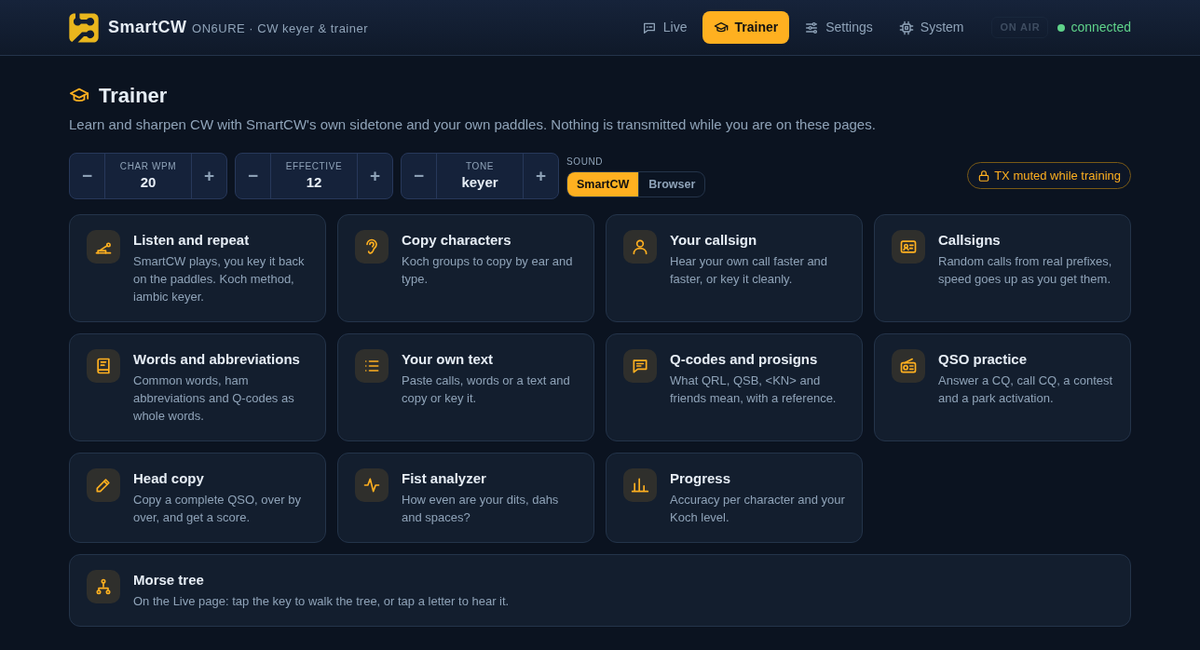
Open smartcw.local or 192.168.7.1 on the connected computer. The Live page shows a visual Morse tree, decoded text, an on-screen key, speed and tone controls, ten text memories, contest serial numbers, beacon, tune and a send/receive monitor. Settings save to a readable config.txt.
The Trainer offers eleven exercises, including Koch practice, callsigns, Q-codes, QSO practice, head copy and a fist analyzer. While a trainer page is open, practice mode prevents transmission through the CW jack and MIDI output.
Key specifications
| Key types | Iambic A, iambic B, ultimatic, bug and straight key |
|---|---|
| Speed | 5–99 words per minute; adjustable on the box |
| Sidetone | 300–2000 Hz on the piezo and line out |
| Radio output | Key line, Audio + PTT, or practice mode |
| Computer interfaces | USB serial, MIDI, network and optional keyboard |
| Computer systems | Linux, macOS and Windows 10/11; no separate driver or app needed |
| Firmware | Open source under the MIT licence; preinstalled, with updates from smartcw.app |
Connect the radio correctly. Set the radio's key input for a straight key when using SmartCW's key-line output. For Audio + PTT, use the appropriate radio microphone or data input and wiring. Trainer practice mode is for off-air work.
Explore before and after ordering
The firmware is open source. Get updates from smartcw.app over the USB cable, using a supported browser or drag and drop. No firmware installation is needed at delivery.
The paddle shown in a product photo is a Begali. Begali is a trademark of its owner and does not endorse SmartCW.
Follow SmartCW and RF.Guru updates
Get new firmware and product notes alongside RF.Guru engineering articles.
Join the notification list →Quick answers
- Does SmartCW need an internet connection to show its controls? No. The web page is served by SmartCW over its USB network connection.
- Will it replace my computer's internet route? No. SmartCW does not hand out a gateway or DNS server.
- Can I use a straight key or bug? Yes. Both are supported key types.
- Can I update the firmware? Yes. Updates come from smartcw.app over the USB cable, using a supported browser or drag and drop. Firmware is already installed when your SmartCW arrives.
Share